

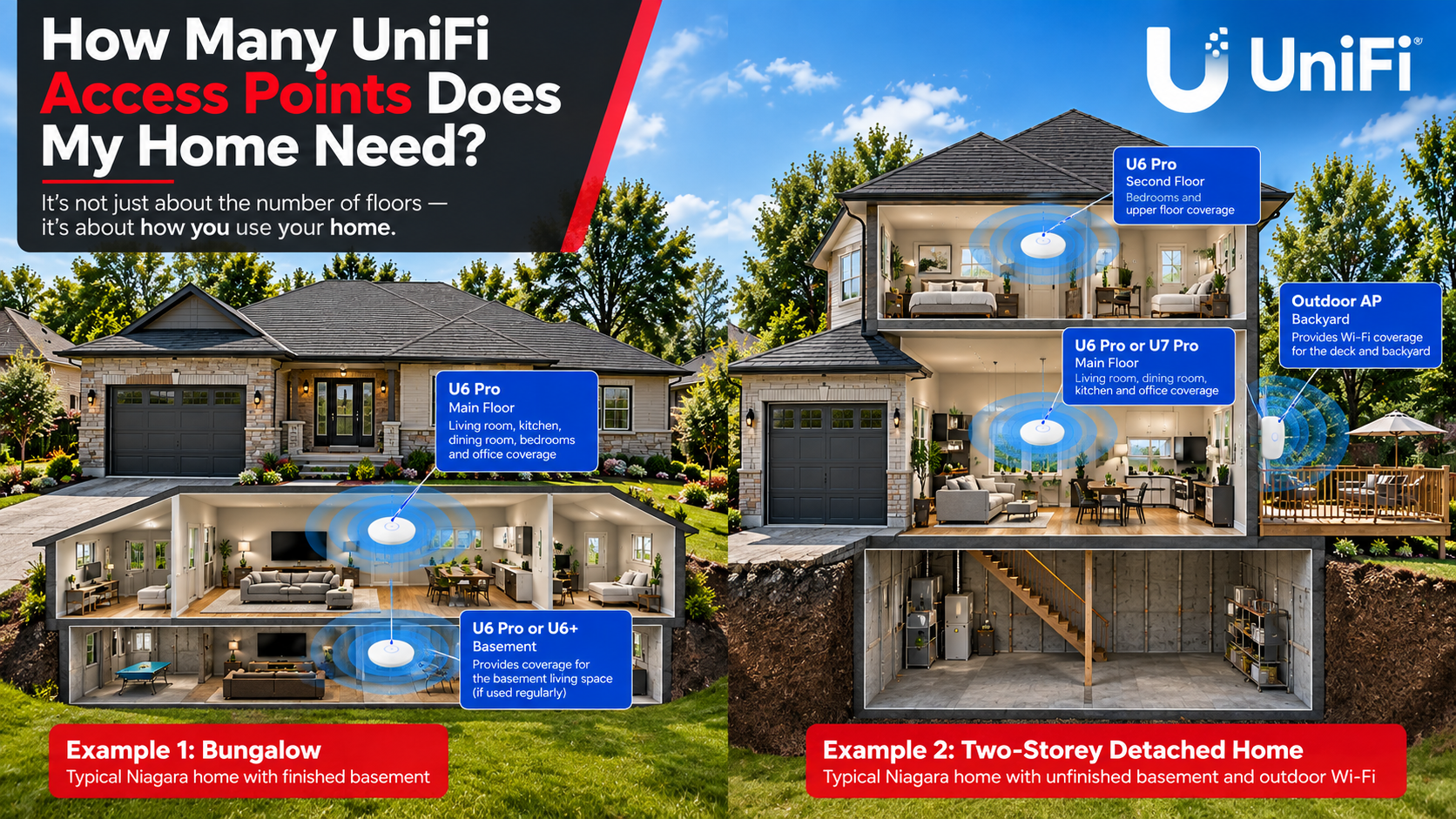
One of the first questions homeowners ask when we're designing a UniFi network is:
How many Wi-Fi access points does my house need?
It's tempting to use a simple rule like one access point per floor, but good Wi-Fi design isn't quite that simple.
At DYW, when we design residential UniFi networks throughout Niagara Region, Hamilton and Burlington, we consider the layout of the home, where Wi-Fi will actually be used, how many devices are in those areas, and what those devices are being used for.
The goal isn't to install as many access points as possible. It's to put the right access points in the right locations.
Not every area of a home needs the same level of Wi-Fi coverage.
A living room with phones, tablets, streaming devices and smart-home equipment has very different requirements from an unfinished basement that's primarily used for storage.
A home office is another good example. If someone works from home every day and relies on video calls and cloud applications, reliable coverage in that area should be a priority.
When designing a UniFi Wi-Fi system, some of the things we consider include:
These factors can often tell us more than simply knowing the square footage or number of floors.
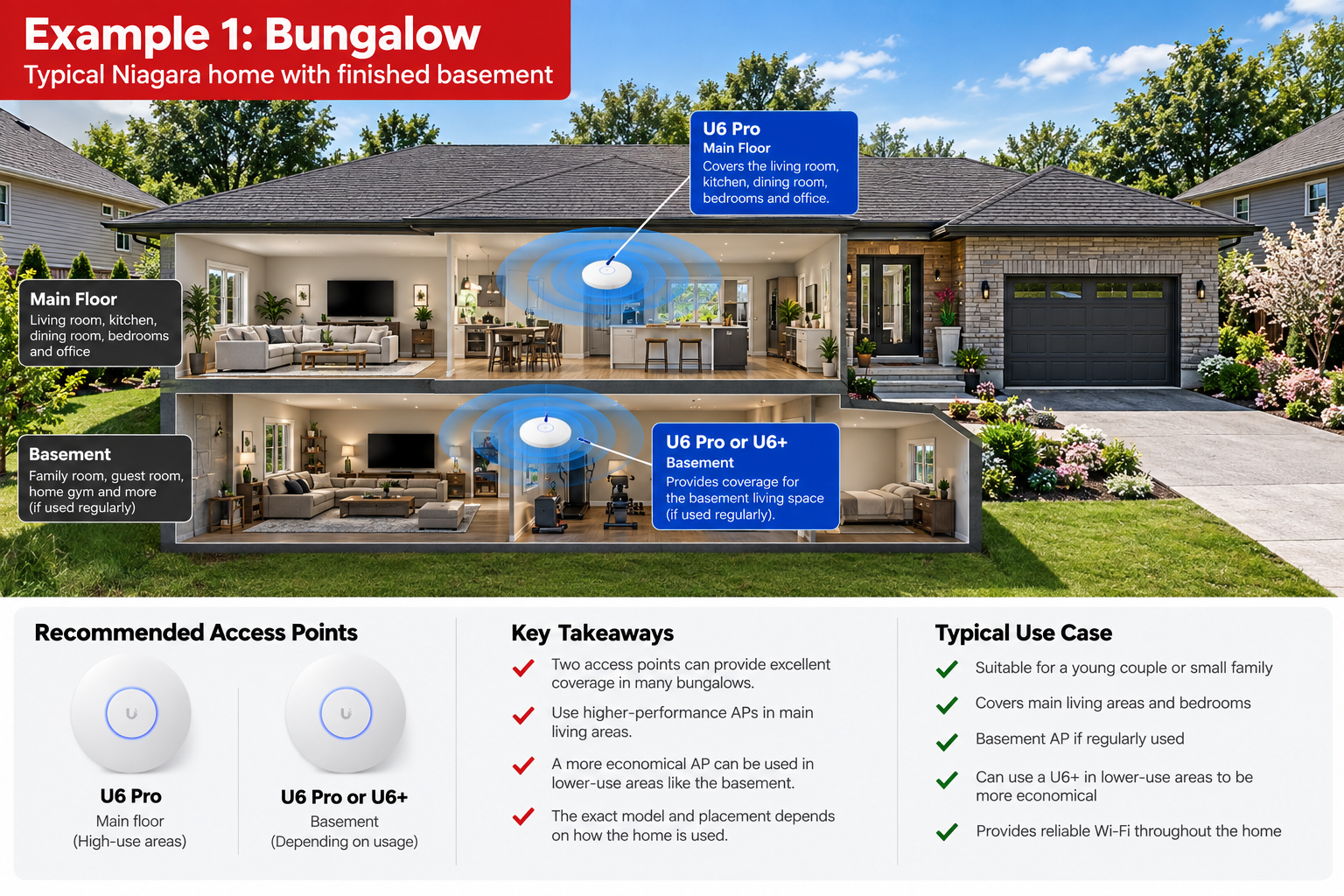
Consider a bungalow occupied by a young couple, potentially with a young child.
For many homes like this, two properly positioned UniFi access points may be enough to provide the coverage the family needs.
On the main floor, we could install a U6 Pro in a location that prioritizes important areas such as the living room, bedrooms and home office.
If the basement is regularly used as additional living space, another U6 Pro could provide strong coverage downstairs.
But what if the basement isn't used very often?
Instead of installing the same access point on both levels, we might use a U6+ in the basement while putting the higher-performance U6 Pro in the areas where the homeowners spend most of their time.
Depending on the home, the basement may even receive adequate coverage from the main-floor access point without requiring a dedicated AP.
The important part is that we're designing the network around how the space is used, rather than automatically installing identical access points on every floor.
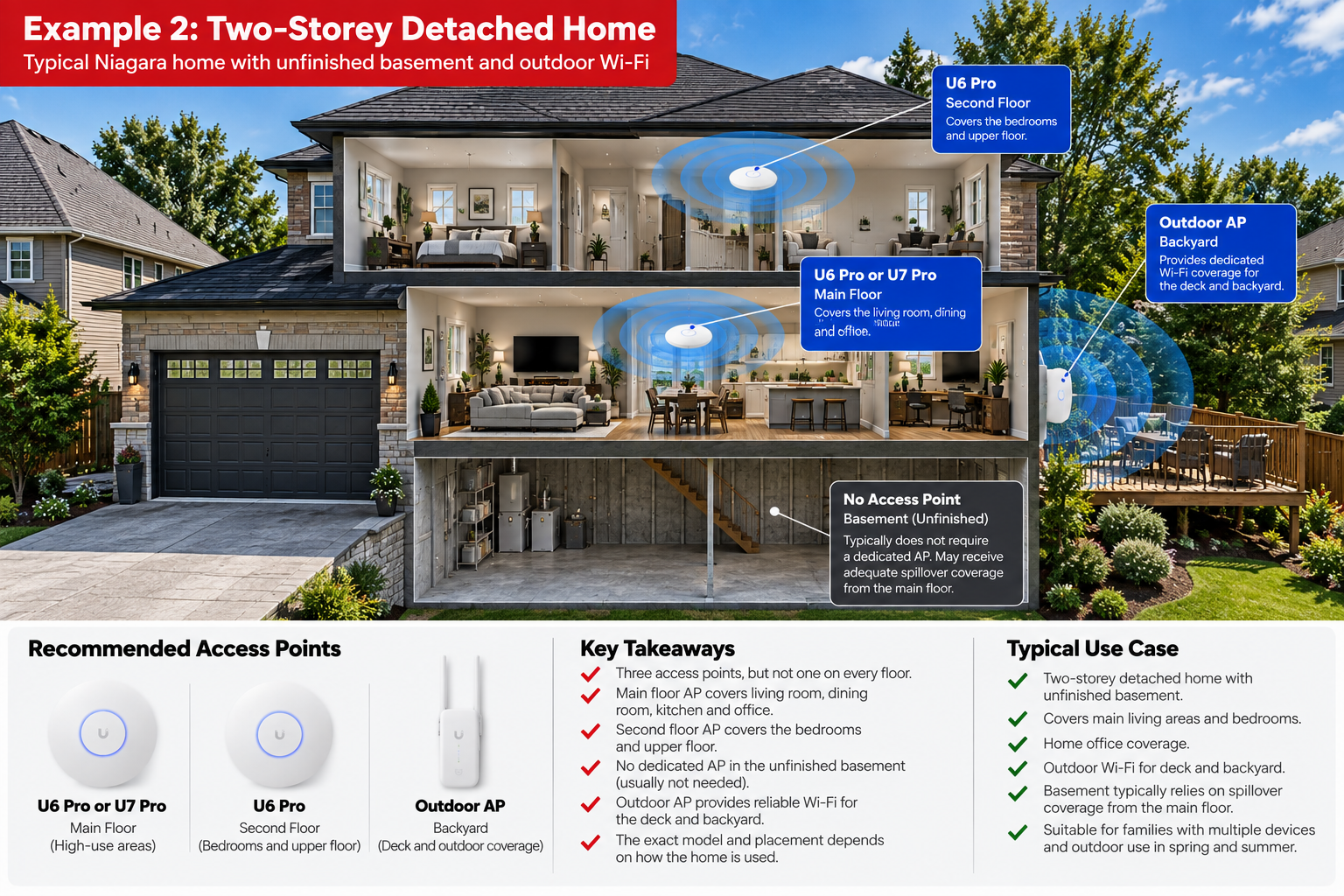
Now consider a two-storey detached home with an unfinished basement and an outdoor deck.
This home has three levels, but that doesn't necessarily mean it needs an access point on each one.
We might design this system with:
In this situation, we may not install an access point in the basement at all.
Because the basement is unfinished and isn't a high-use area, a dedicated access point may provide very little benefit. Depending on the construction of the home, there may also be enough spillover coverage from the main-floor AP for occasional basement use.
Instead, we can put that third access point somewhere the homeowners will get much more value from it: outside.
During the spring and summer, a dedicated outdoor AP can provide Wi-Fi around the deck and backyard for phones, tablets, music streaming and other connected devices.
This is a good example of why one access point per floor isn't always the best approach.
Adding more access points isn't always the solution to poor Wi-Fi.
The location of each AP, construction of the home, interference and network configuration all affect performance.
We would rather install two properly positioned access points than install three or four simply because of the home's square footage or number of floors.
That's also why we prefer to plan access point locations before installing the network cabling.
Once we know where coverage is most important, we can run CAT6 directly to those locations and provide each access point with a hardwired connection back to the network.
Another important question is what Wi-Fi will be used for in each area.
A home office being used eight hours a day should generally receive more consideration than a basement storage area that someone visits for ten minutes.
The same applies when selecting the access points themselves.
Not every area necessarily requires the highest-performance AP available. We can use higher-performance equipment in important areas while using a more economical access point—or no dedicated access point at all—in lower-use areas.
This allows us to put the homeowner's networking budget where it will actually make a difference.
If you regularly use your backyard, patio or deck, outdoor Wi-Fi should be considered when designing the network.
Rather than relying on an indoor access point to push a signal through the exterior walls of the home, we can install an outdoor-rated UniFi access point in an appropriate location.
This can provide dedicated coverage for things such as:
For homeowners who spend a lot of time outside during the warmer months, an outdoor AP may provide much more value than adding another access point to a low-use area inside the house.
There isn't one answer.
A bungalow may work extremely well with two access points. A larger three-level home might use three—but that doesn't necessarily mean one on every level.
We consider factors such as the home's layout, where Wi-Fi is used most, the number of connected devices, building materials, home offices, basement usage and outdoor coverage.
The key is simple:
Wi-Fi should be designed around how you use your home—not just how many floors you have.
Display Your Way designs and installs residential UniFi networks throughout Niagara Region, Hamilton and Burlington.
We can assess your home, determine where Wi-Fi coverage is actually needed, recommend appropriate UniFi access points and install the CAT6 network cabling required to hardwire them back to your network.
Whether your home needs one access point or several, our goal is to build the network around the property and the people using it.
Contact Display Your Way for a free on-site consultation and get wired up.
St. Catharines | Niagara Falls | Hamilton | Burlington | Lincoln | Niagara-on-the-Lake | Grimsby | Thorold | Welland | Pelham


Reliable installs. Backed by warranty